How to Choose a Short Drama App: What to Check Before You Download
Pricing models, free episodes, subscriptions, ads, subtitles and privacy: a checklist for comparing short drama apps before you commit time or money.
There are now many apps dedicated to vertical short dramas, and new ones appear regularly. They look similar at first glance, but they differ in how they charge, how many episodes are free, what languages they support, and how easy it is to cancel a subscription. A few minutes of checking can save money and frustration later.
Start with the official stores
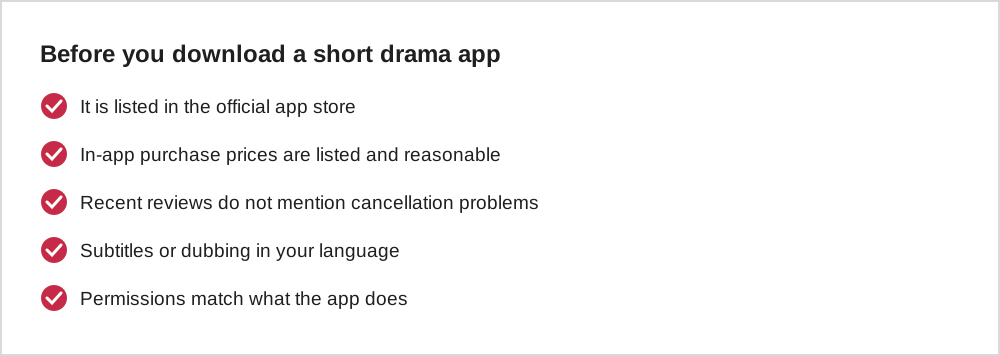
Download short drama apps only from the official Apple App Store or Google Play. Ads for short dramas are everywhere on social media, and some lead to look-alike apps or websites. Our guide to fake apps and misleading ads explains what to watch for.
Compare how each app charges
| Model | How it works | Watch for |
|---|---|---|
| Coins per episode | Buy coin packs, spend coins to unlock episodes | Total cost of a whole series |
| Weekly or monthly pass | Auto-renewing access to all or most episodes | Renewal dates and price after a trial |
| Ad unlocks | Watch an ad to unlock an episode | Time spent on ads |
| Daily check-in rewards | Free coins for logging in | Limits and expiry of free coins |
Many apps combine several of these. The store page usually lists in-app purchase prices; it is worth reading before you install. Our guide to how coin systems work explains the maths.
Read recent reviews, not just the rating
The average rating hides a lot. Recent two- and three-star reviews often mention exactly what you need to know: sudden price changes, hard-to-cancel subscriptions, missing subtitles, or episodes that stop loading. Sort reviews by most recent if the store allows it.
Language, subtitles and dubbing
If you prefer watching in a particular language, check whether the app offers subtitles, dubbing, or both, and whether you can switch. Some series are originally produced in English; others are dubbed or subtitled from another language. See our guide to dubbing and localisation.
Privacy and permissions
Check the App Privacy section on the Apple App Store or the Data safety section on Google Play. Short drama apps generally do not need access to your contacts, location or microphone. If an app asks for permissions that do not match what it does, that is a reason for caution.
Before starting any free trial, note the date it ends. Many trials convert automatically into a paid weekly or monthly subscription.
Testing an app before paying
A good way to test a new app is to watch the free episodes of one series without buying anything. Pay attention to how often purchase prompts appear, how clear the coin prices are, and whether subtitles and playback work smoothly. Check whether you can find the subscription terms easily before any purchase screen appears.
If the app constantly interrupts you with offers or hides prices until the last moment, that tells you a lot about how it will treat you as a paying viewer.
A ten-minute comparison method
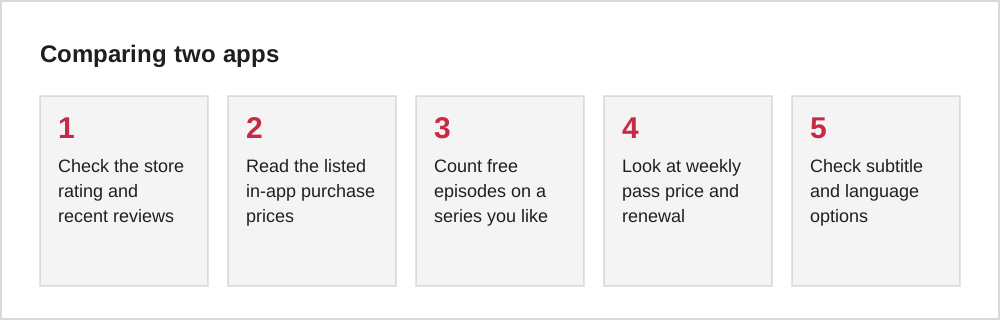
If you are choosing between two or three apps, a short structured test is more useful than browsing. Install each from the official store, then open the same kind of series in each, for example a contract marriage romance. Note how many episodes are free, how many coins an episode costs, the price of the smallest coin pack and whether a weekly pass is pushed on the first screen.
Write the numbers in a simple table. Then check the settings for autoplay, notifications and subtitle options. After ten minutes you will know which app is cheaper per episode, which is most honest about its prices and which is easiest to control. The app with the biggest catalogue is not always the best value if its episodes are priced higher.
Red flags before you pay
Some warning signs are worth taking seriously. Be cautious if an app asks for payment details before showing any episodes, if the subscription price is shown in small grey text under a large button, or if the only option offered is a free trial that converts automatically into a weekly charge. Reviews mentioning unexpected charges or difficulty cancelling are another strong signal.
Be equally wary of apps that ask for permissions unrelated to video, such as contacts or precise location, and of apps whose developer name does not match the brand you expected. None of these automatically means an app is a scam, but each is a reason to slow down. Our guide to fake drama apps and ads covers what to do if something already went wrong.
Common questions
Is one app better than another?
It depends on which shows you want and how you prefer to pay. Many popular series are exclusive to one app. The best choice is often the app that has the specific series you want, with a pricing model you are comfortable with.
Should I install several apps?
Having several apps makes it easy to lose track of coin balances and subscriptions. If you do use more than one, check your subscription list in your phone's settings once a month.
The short version
Install only from official stores, compare how each app charges, read recent reviews, check subtitles and permissions, and note trial end dates. The right app is the one that has the shows you want with a pricing model you understand.